
This is Part 8 of the Claude Code Series, a complete guide to Claude Code from first principles to real-world use. Start from Part 1 if you are just joining, or pick up from Part 7 if you just finished the prompting post.
At some point in every Claude Code session, you are looking at code.
Maybe Claude Code shows you what it is about to run before executing it. Maybe you open a file it just wrote to check the result. Maybe something went wrong and the error message points to a specific line.
If you have never written code seriously, that moment can feel opaque. A wall of text that might be right or might be wrong and you have no way to tell the difference.
This post is about changing that. Not by teaching you to code. By teaching you to read.
Reading code and writing code are different skills. Writing code from scratch requires knowing syntax, logic, libraries, debugging, and years of pattern recognition. Reading code well enough to understand what it does requires much less. You are not authoring. You are auditing.
The goal by the end of this post is specific: you should be able to look at a Python or JavaScript script Claude Code wrote, understand what it is doing at a high level, spot the obvious problems, and ask intelligent questions when something looks off. That is enough to work with Claude Code seriously without being in the dark.
The Right Frame: You Are Reading, Not Reviewing
Before getting into the specifics, the frame matters.
When a developer reviews code, they are checking for correctness, efficiency, security, edge cases, style. They bring years of context and they are responsible for what gets shipped.
That is not your job here. Your job is narrower and more achievable: does this code do what I asked? Are there any obvious signs it is doing something I did not ask for?
You are not trying to catch every flaw. You are trying to understand the shape of what is there. That is a much lower bar, and it is the right bar for working effectively with Claude Code.
Start With the Structure, Not the Details
When you see a block of code, the instinct is to read it line by line from the top. That is the wrong place to start.
Start with the structure. What are the main sections? Where does the script begin and where does it end? What are the big pieces?
In Python, the structure usually looks like this. There is a section at the top where libraries are imported. Then there are function definitions, blocks that start with def followed by a name. Then at the bottom, there is usually a section where those functions are actually called, often inside a block that looks like if __name__ == "__main__":.
In JavaScript, the structure is similar. Imports or require statements at the top. Functions defined either with the functionkeyword or with arrow syntax (=>). Then the code that runs those functions at the bottom.
Once you can identify these sections visually, the code becomes much less intimidating. You know where the definitions live. You know where the action happens. You can skip between sections rather than reading every line in order.
Reading a Real Example
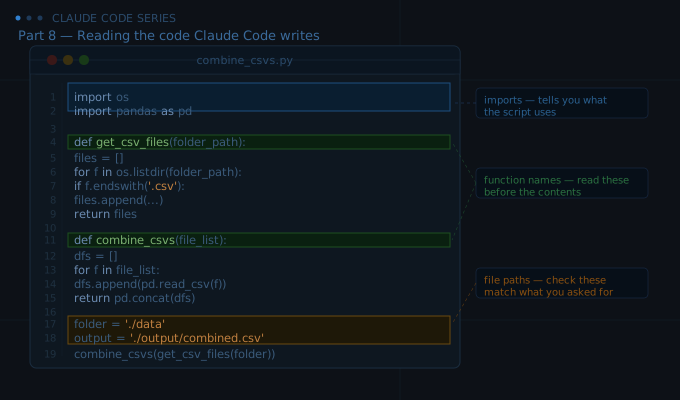
Here is a short Python script Claude Code might write to read a folder of CSV files and combine them into one.
import os
import pandas as pd

def get_csv_files(folder_path):
    files = []
    for filename in os.listdir(folder_path):
        if filename.endswith('.csv'):
            files.append(os.path.join(folder_path, filename))
    return files

def combine_csvs(file_list):
    dataframes = []
    for file in file_list:
        df = pd.read_csv(file)
        dataframes.append(df)
    return pd.concat(dataframes, ignore_index=True)

def main():
    folder = './data'
    output_file = './output/combined.csv'

    csv_files = get_csv_files(folder)
    print(f"Found {len(csv_files)} CSV files")

    combined = combine_csvs(csv_files)
    combined.to_csv(output_file, index=False)
    print(f"Saved combined file to {output_file}")

if __name__ == "__main__":
    main()
Let us read this the way a non-developer actually can.
The imports. The first two lines bring in os and pandas. os is a standard library for working with the operating system, like listing files in a folder. pandas is a library for working with data tables. Seeing these two at the top tells you the script will navigate the file system and do something with tabular data. That matches what you asked for.
The function names. There are three functions: get_csv_files, combine_csvs, and main. The names tell you what each one does before you read a single line inside them. Get the CSV files. Combine the CSVs. Run everything. Function names are usually the most readable English in any script. Read them before the contents.
What get_csv_files does. It takes a folder_path, loops through the files in that folder, and collects the ones that end with .csv. It returns a list of those file paths. That is exactly what you would expect from a function called get_csv_files.
What combine_csvs does. It takes a list of files, reads each one into a dataframe (a table, in pandas terminology), and concatenates them all into one big table. The ignore_index=True part just means the row numbers restart from zero in the combined file rather than keeping the original numbering. Fine.
The main function. This is where the script actually runs. It sets the folder to ./data and the output path to ./output/combined.csv. Then it calls the two functions in order. This is the part you want to read carefully because this is where the actual file paths live. If you asked Claude Code to read from a folder called raw_data and the path here says ./data, that is a discrepancy worth catching.
The last two lines. if __name__ == "__main__": main() is standard Python boilerplate. It means “only run the main function if this script is executed directly, not if it is imported by another script.” You will see this in almost every Python script. It means nothing is wrong. Move on.
That whole reading took about two minutes. And now you know: the script reads CSVs from ./data, combines them, and saves to ./output/combined.csv. You can check those paths match what you wanted. You can check that the function names match the task. You can ask Claude Code to explain anything that does not make sense.
The Things Worth Checking Every Time
You do not need to read every line of every script. But there are a few things worth checking in any code Claude Code writes.
File paths. Where is the script reading from and writing to? These are the most common source of surprises. If you asked Claude Code to work in a specific folder and the path in the code points somewhere else, catch it before running.
What gets deleted or overwritten. Look for words like delete, remove, unlink, overwrite, or os.remove. If the script deletes files, you want to know that before it runs. Same for operations that write to a file without checking if it exists first — those silently overwrite whatever was there.
Loops. A loop that runs once is easy to predict. A loop that runs once for each file in a folder could run ten times or ten thousand times depending on what is in that folder. When you see a loop, ask: what is it iterating over, and do I know how many things are in that collection?
The output. What does the script actually produce? A file? A print statement? A network request? Make sure the output matches what you asked for.
Hardcoded values. If you see a specific number, a file path, or a string value typed directly into the code rather than passed in as a variable, that is worth noticing. Hardcoded values mean the script will only work in one specific context. If you move the files or rename the folder, the script breaks. Ask Claude Code to make those values configurable if you plan to reuse the script.
When You Do Not Understand Something
This will happen. You will read a line and have no idea what it does.
The right response is not to skip it and hope for the best. It is to ask.
The most useful question to ask Claude Code about code you do not understand is: “What does this line do, and why did you write it this way?” That question gets you both the explanation and the reasoning, which helps you decide whether the reasoning matches your situation.
You can also ask Claude Code to rewrite a section in a simpler way. Sometimes the code is more complex than it needs to be because Claude Code made an assumption about your level or your needs. A simpler version that does the same thing is always available.
And you can ask Claude Code to add comments explaining what each section does. A well-commented script is much faster to audit than an uncommented one. This is worth asking for on any script you plan to keep and reuse.
Reading Error Messages
Error messages are code output, and reading them is the same skill as reading the code itself.
Most error messages follow the same structure. There is a traceback, which is a trail showing which part of the code was running when the error happened. And there is the error message itself at the bottom, which says what went wrong.
The bottom of the traceback is where to start. Read the last line first. It usually says something like FileNotFoundError: [Errno 2] No such file or directory: './data' or KeyError: 'date' or TypeError: unsupported operand type(s) for +: 'int' and 'str'.
These messages are more readable than they look:
FileNotFoundErrormeans the script tried to open a file or folder that does not exist. Check the path.KeyErrormeans the script tried to access a column or key that is not in your data. Check your file against what the script expects.TypeErrormeans the script tried to do something with a value of the wrong type, like adding a number to a word.PermissionErrormeans the script does not have access to the file. Usually a folder permissions issue.
When you get an error, copy the full traceback and the error message and bring it back to Claude Code. Say what you were trying to do and what happened. Claude Code will almost always diagnose it correctly and tell you the exact fix.
You Are Now in the Conversation
Reading code is not the goal in itself. The goal is to be an active participant in the session rather than a passive recipient.
When you can read what Claude Code wrote, you can confirm it matches your intentions. You can ask targeted questions. You can catch the small discrepancies before they become bigger problems. You can say “the path here says ./data but my folder is called raw_data, please fix that” rather than running the script, seeing it fail, and not knowing why.
That is the difference between using Claude Code and working with Claude Code. Part 9 is about what happens when the code runs and something goes wrong. Errors, loops, wrong turns, and how to debug them without a computer science degree.
See you there.
Claude Code Series — Part 8 of 18. A complete guide to Claude Code from first principles to real-world use.