
This is Part 7 of the Claude Code Series, a complete guide to Claude Code from first principles to real-world use. Start from Part 1 if you are just joining, or pick up from Part 6 if you just finished the first real session.
After Part 6, you have seen a real Claude Code session. You have seen what works and at least one moment where something needed correcting.
Now here is the question that naturally follows: why did some prompts produce exactly what I wanted, and others required a follow-up?
That is what this post is about. Prompting Claude Code is a different skill from prompting Claude in the chat interface. Not completely different. But different enough that habits from one will sometimes work against you in the other.
By the end of this post you will have a clear set of patterns you can apply immediately. And just as importantly, you will understand why they work, which means you can adapt them when a situation does not fit neatly into a pattern.
Why Prompting for an Agent Is Different
In the chat interface, Claude responds and waits. If the response is not quite right, you say so. The feedback loop is tight and fast. You can afford to be vague in your first prompt because correcting course costs almost nothing.
Claude Code operates differently. It plans, takes multiple steps, and builds on each previous action. A misunderstanding in the first prompt does not just produce one wrong response. It can produce five wrong steps in sequence before Claude Code pauses or you notice. By that point, untangling the situation takes more effort than a careful prompt upfront would have.
This changes the economics of prompting. In the chat interface, precision is nice to have. In Claude Code, precision at the start is genuinely worth the extra thirty seconds it takes.
That said, precision does not mean length. The best Claude Code prompts are often shorter than people expect. The difference is not word count. It is the right information in the right place.
Pattern One: Describe the Outcome, Not the Steps
The most common prompting mistake in Claude Code is telling it what to do rather than what to produce.
This comes from the chat interface habit. In a chat, you say “write a function that does X” because Claude writes one function and hands it to you. You are managing the process.
In Claude Code, you are not managing each step. Claude Code is. So the prompt that works is not “write a function that does X, then write another function that does Y, then connect them.” That prompt is you doing the planning. Claude Code can plan.
The prompt that works is: “I need a script that takes a folder of CSV files and merges them into a single file called output.csv. Files may have different headers. The merged file should include all columns from all files, filling with empty values where a file does not have a particular column.”
That describes the finished result. Claude Code figures out the steps.
The exception is when you have a strong preference about how something should be done. If you care about the approach, say so. But separate it from the outcome description: “I need a script that merges CSV files [outcome]. Use pandas rather than the csv module [constraint].” Now Claude Code knows what to build and one specific preference about how to build it.
Pattern Two: Scope the Task Explicitly
Claude Code will expand to fill the space you give it.
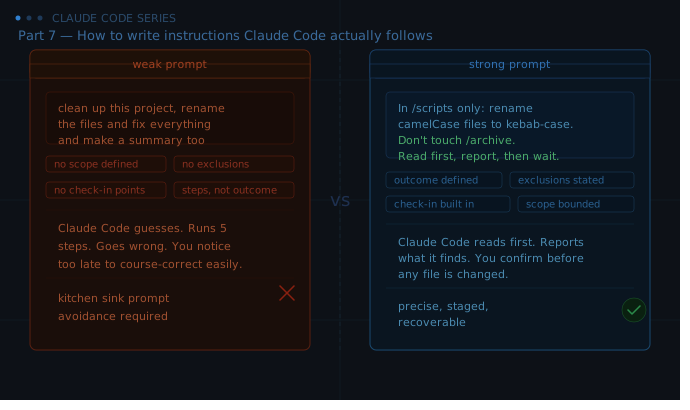
If you say “clean up this project,” Claude Code will read the folder, form opinions about what needs cleaning, and start making changes. Some of those changes will be things you wanted. Some will not. And by the time you see the results, it may have touched thirty files.
Scope prevents this. Be specific about what is included and what is not.
Instead of “clean up this project,” try: “Look at the files in the /scripts folder only. Rename any file using camelCase to kebab-case. Do not touch anything outside /scripts. Do not change file contents, only filenames.”
Four sentences. Every sentence reduces a category of unwanted action. The folder is bounded. The operation is defined. The exclusions are stated. The scope of change is limited.
Scoping is especially important when you are working in a folder that contains things you do not want touched. State what is off limits. Do not assume Claude Code will infer it from context.
Pattern Three: Set Check-in Points for Long Tasks
If a task has multiple stages, build in moments where Claude Code reports before continuing.
This is the pattern I mentioned in Part 6 with the CLAUDE.md rule about checking in before affecting more than five files. But it applies more broadly than just file operations.
For a multi-stage task, the prompt might look like this:
“I need to process 40 markdown files. Stage one: read all the files and give me a summary of what you find — file count, any obvious formatting issues, files that seem incomplete. Do not change anything in stage one. Wait for my go-ahead before starting stage two.”
This gives you visibility before commitment. You can catch a misunderstanding at the summary stage, before forty files have been modified.
The check-in pattern also helps with tasks where later stages depend on earlier ones. If stage one reveals something unexpected, you can adjust the instructions for stage two rather than discovering the problem at the end.
Pattern Four: Tell Claude Code What Not to Do
Exclusions are as important as inclusions, and people almost always forget them.
Every prompt describes what you want. Far fewer prompts describe what you do not want. But Claude Code, like anyone given a task with room to interpret, will make judgment calls. It will decide what to do with edge cases, ambiguous files, uncertain situations. If you have not told it how to handle them, it will guess.
The guesses are usually reasonable. But reasonable is not always right.
A few exclusions worth building into the habit:
- Which folders or files are off limits
- What to do when a file is ambiguous or incomplete (skip it, flag it, ask)
- Whether to overwrite existing files or create new ones
- Whether to delete anything (if you have not said to delete, it should not)
- Whether to install packages or dependencies without asking
You do not need all of these in every prompt. But think about which ones apply to your task and state them.
Pattern Five: Give Claude Code a Way to Ask
Some tasks have genuine decision points that you should make, not Claude Code.
If you write a prompt that leaves these unaddressed, Claude Code will either guess or stop and ask. Guessing is worse. Stopping and asking is exactly right but only if you have given Claude Code permission to do so.
This sounds obvious but there is a failure mode worth naming. If your prompt is phrased as a command with no room for questions, Claude Code sometimes feels the pressure of that framing and guesses rather than interrupting. A simple phrase at the end changes this:
“If you encounter anything unexpected or ambiguous, stop and ask before proceeding.”
One sentence. It changes the dynamic significantly. Claude Code will flag things rather than make quiet decisions you would have wanted to make yourself.
Pattern Six: Separate Exploration From Execution
The most underused pattern in Claude Code is the two-phase approach: read and report first, act second.
Ask Claude Code to look at what exists before it touches anything. This is what I did in Part 6 with the inventory prompt. It is not just a safety measure. It is also how you get better results.
When Claude Code reads the files first, it understands the actual state of things rather than assuming. It notices the three draft files you would have wanted excluded. It sees that some files have different headers. It flags the thing you had forgotten about.
The information Claude Code surfaces in an inventory prompt regularly changes what I ask it to do next. Not dramatically. But the task I end up running is better calibrated than the one I started with.
Make the two-phase approach a default for any task involving more than a handful of files: “First, read the folder and tell me what you find. Do not change anything. Then wait.”
The One Prompt to Avoid
There is one prompting pattern that causes more problems than any other, and it is tempting because it feels efficient.
It is the kitchen sink prompt. Everything you want done, listed in one message, with no staging or check-in points.
“Read all the files, rename them to kebab-case, fix the frontmatter, add missing tags based on the content, generate a summary CSV, and create an index.md that links to all of them.”
That is five distinct operations. Each one has edge cases. Each one builds on the previous. If Claude Code makes a judgment call in step two that turns out to be wrong, it carries through all the way to step five before you see it.
Break kitchen sink prompts into stages. Do the first operation, check the result, then continue. The session takes a little longer. The result is reliably better.
Putting It Together
These patterns are not rules to memorise. They are a checklist to run through before you send a prompt for a significant task.
Does this describe an outcome or a list of steps? Is the scope bounded? Do I need a check-in point before Claude Code runs the whole thing? Have I stated the important exclusions? Is there anything ambiguous that Claude Code should ask about rather than guess?
One pass through those questions before a long task is worth more than any amount of correcting afterwards.
In the next post, we shift from how to give instructions to how to read the results. Part 8 is about understanding the code Claude Code writes well enough to know if it is doing what you asked, without needing a computer science degree to do it.
What’s Next
Part 8: Reading the code Claude Code writes. Not becoming a developer. Just not being in the dark.
See you there.
Claude Code Series — Part 7 of 18. A complete guide to Claude Code from first principles to real-world use.