This is Part 1 of the Claude Code Series, a complete guide to Claude Code from first principles to real-world use. No CS degree assumed. Technical when it needs to be. Honest throughout.
I want to start with the moment it clicked for me.
I had been using Claude in the chat interface for months. I was good at it. I knew how to write prompts, how to use Projects, how to get useful output from a well-structured conversation. I had built the meeting notes summariser from the Claude Series. I felt like I understood what Claude could do.
Then I opened Claude Code for the first time.
I typed a task into the terminal. Not a question. Not a prompt asking for output I would then copy and paste somewhere. Just a description of something I wanted done. Claude Code read my project files, figured out what needed changing, made the changes, ran the code to check it worked, noticed an error, fixed the error, and told me it was done.
I had not touched a single file.
That was the moment. Not because it was magic. But because I suddenly understood that I had been thinking about AI assistance the wrong way. The chat interface is a conversation. Claude Code is a collaborator. One responds to you. The other works alongside you.
This series is about understanding that difference deeply enough to actually use it.
What Claude Code Actually Is
Claude Code is a command line tool built by Anthropic. You run it in your terminal, you give it a task, and it works on that task using the files and tools available in your current environment.
That description sounds simple. The implications are not.
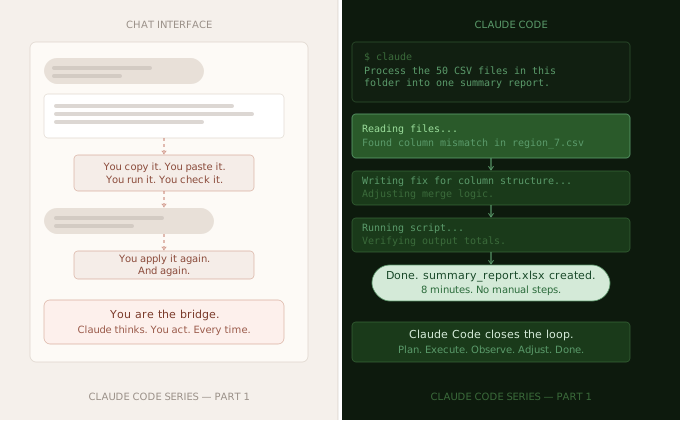
When you use Claude in the chat interface, you are the bridge between Claude and the real world. Claude produces text. You take that text and do something with it. You copy the code into your editor. You paste the draft into your document. You manually apply whatever Claude suggested. Claude thinks. You act.
Claude Code removes you from that loop.
It can read your files directly. It can write to them. It can run commands. It can check whether the code it wrote actually works. It can look at the error, understand what went wrong, and try a different approach. All of this happens in a single session without you having to ferry information back and forth.
This is what people mean when they talk about agentic AI. Not AI that is smarter, but AI that can act. The difference between a very knowledgeable person who can only talk to you and one who can actually sit down at your computer and work.
Why Anthropic Built It
The chat interface is excellent for a specific kind of task. You have a question, Claude answers it. You have a piece of writing, Claude improves it. You have a decision, Claude helps you think through it. All of these are tasks where the output is text that you then use.
But a large and growing category of useful tasks are not like that. They are tasks where the output is not text to read but work to be done. A folder of files to process. A script to write, test, and run. A codebase to modify in a specific way. A pipeline to build and verify.
For those tasks, the chat interface creates friction. Not insurmountable friction. I built real things using the API in the Claude Series. But friction nonetheless. Every step where you have to manually copy, paste, apply, check, and report back is a step where things can go wrong, where you lose context, and where the cognitive load sits on you rather than on Claude.
Claude Code was built to remove that friction for the category of tasks that involve actually doing things with files and code. It is Anthropic’s answer to the question: what does AI assistance look like when the work is not writing a response but completing a task?
How It Is Different From the Chat Interface
Let me make this concrete with a comparison.
Say you want to take a folder of fifty CSV files, each containing sales data for a different region, and combine them into one clean summary spreadsheet with totals by region and month.
In the chat interface: You describe the task to Claude. Claude writes you a Python script. You copy that script into a file. You run it. It throws an error because one of your CSV files has a slightly different column structure. You copy the error back to Claude. Claude fixes the script. You copy the new version. You run it again. This time it works but the totals look wrong. You investigate, find the problem, tell Claude. Claude fixes it again. Eventually it works. Total time: probably forty-five minutes to an hour, split between Claude sessions and your own investigation.
In Claude Code: You open Claude Code in the folder containing the CSV files. You describe the task. Claude Code reads a few of the files to understand their structure, writes the script, runs it, notices the column discrepancy, fixes the script, runs it again, checks the output looks correct, and tells you it is done. Total time: maybe eight minutes. You watched it happen.
Same task. Same underlying capability. Completely different experience.
The difference is not intelligence. It is agency. Claude Code can close the loop itself. It does not need you to be the messenger between the thinking and the doing.
Who Claude Code Is For
This is worth being direct about because most of the content written about Claude Code assumes the reader is a software developer who wants a faster coding assistant.
That is one audience. It is not the only one.
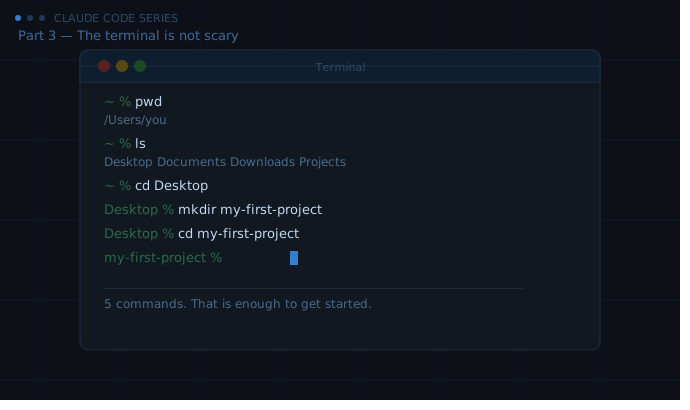
Claude Code is useful for anyone who works with files, data, and repeatable processes — regardless of whether they write code professionally. You do not need to know Python to use Claude Code to process your files. You do not need to understand shell scripting to use Claude Code to automate a task you do every week. You do need to be comfortable with the terminal, which we will cover in Part 3, and you need to be willing to understand enough of what Claude Code is doing to direct it intelligently.
That last part matters. Claude Code works best when you are engaged with what it is doing, not just watching. The people who get the most from it are not the ones who type a task and walk away. They are the ones who follow along, ask questions, push back when something looks wrong, and understand the work well enough to know when it is done correctly.
That is a learnable skill. That is what this series is about.
What Claude Code Is Not
A few things worth clearing up before we go further.
It is not a replacement for knowing what you want. Claude Code is very good at figuring out how to do something. It is not good at figuring out what you should be doing in the first place. If you give it a vague task, you will get a vague result. The quality of your direction determines the quality of what it produces. This is true in the chat interface and it is even more true in Claude Code, where the consequences of going in the wrong direction are more concrete.
It is not infallible. Claude Code makes mistakes. It misunderstands requirements. It writes code that works technically but does not do what you meant. It occasionally goes down a path that needs to be abandoned and restarted. Understanding how to catch these things and correct course is as important as knowing how to give a good initial instruction. We will spend an entire post on this.
It is not free to run indefinitely. Claude Code uses the API, which means it uses tokens, which means it costs money. For the tasks in this series, the costs are small. But for large projects with many files and long sessions, it adds up. We will talk about how to be efficient without being paranoid about it.
It is not a security risk if you treat it sensibly. Claude Code can only act on what you give it access to. It cannot reach outside your current environment without you explicitly enabling that. The habits around file permissions and sandboxing are simple and worth building early. We will cover them in Part 8.
What This Series Will Cover
Over eighteen parts, we will go from opening a terminal for the first time to building real pipelines that run themselves.
The first five parts cover understanding and setup. What Claude Code is, how it thinks, getting comfortable with the terminal, installing everything, and configuring it for the way you actually work.
Parts six through ten cover core skills. What a real session looks like, how to write instructions that Claude Code actually follows, how to read the code it writes well enough to direct it, what to do when things go wrong, and how to work with files safely.
Parts eleven through fourteen apply everything to real use cases. Automation, building tools, working with data, content workflows.
Parts fifteen through eighteen go deep. The CLAUDE.md file, combining Claude Code with direct API calls, handling multi-file projects, and the capstone reflection on what changes when Claude Code becomes a normal part of how you work.
The series is in depth by design. There is already plenty of surface-level content about Claude Code. This is not that. If you are willing to go slowly and understand what is actually happening, you will come out the other side with a genuinely different set of capabilities.
Before the Next Part
You do not need to install anything yet. Part 2 is about how Claude Code thinks, which is worth understanding before you ever run a command. Part 3 is the terminal introduction. Part 4 is the installation.
But if you want to get a feel for what we are building towards, go to your terminal right now and type ls and press enter. That command lists the files in your current folder. If you see a list of files appear, you are already further along than you think.
If you do not know where your terminal is, that is fine. Part 3 starts from there.
What’s Next
Part 2 is the most important conceptual post in the series.
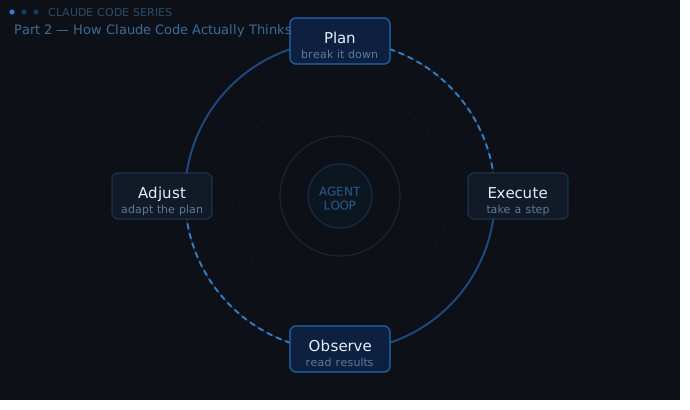
To use Claude Code well, you need to understand something that most people skip: Claude Code is not just a faster version of the chat interface. It is a fundamentally different kind of system. It plans. It executes. It observes the results. It adjusts. It tries again.
That loop, plan, execute, observe, adjust, is what makes it an agent rather than a responder. And understanding that loop changes how you direct it, what you expect from it, and how you recover when it goes wrong.
See you in Part 2.
Claude Code Series — Part 1 of 18. A complete guide to Claude Code from first principles to real-world use.