This is Part 14 of the Claude Series, a beginner-to-expert guide to using Claude from scratch. If you’re just joining, start with Part 1: What Is Claude and Why Does It Feel Different From Google?
Everything we have built so far in this series has followed the same pattern.
You give Claude something. Claude processes it. Claude gives you something back.
That pattern is genuinely powerful. The meeting notes summariser from Part 13 is a good example. You paste in chaos, you get back structure. Real value, minimal friction.
But notice what Claude cannot do in that pattern. It cannot go and get the meeting notes itself. It cannot check your calendar to see which meetings you had this week. It cannot save the summary directly into your Notion workspace. It cannot email the action items to the people whose names appear in them.
Claude can process information brilliantly. But until now, it has had no way to act in the world.
MCP changes that.
What MCP Is
MCP stands for Model Context Protocol. If you follow the AI Foundations series on this blog, there is a full post there explaining it in depth. For this series, here is what you need to know.
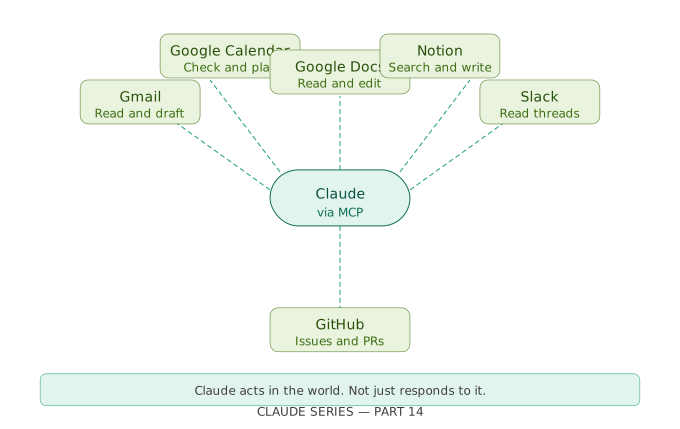
MCP is a standard that lets Claude connect to external tools and services. Email. Calendar. Documents. Databases. Project management tools. Anything that has built an MCP connection.
Without MCP, Claude lives inside a conversation. It reads what you give it and responds. With MCP, Claude can reach out, check things, retrieve information, and take actions in the tools you already use every day.
The analogy I keep coming back to is this. Imagine hiring a brilliant assistant who could only work if you printed everything out for them, handed it over, read their response, then went and did everything they suggested yourself. That is Claude without MCP.
MCP gives that assistant access to your email, your calendar, your files, and the ability to actually do things rather than just advise you on them.
How It Works in Practice
You do not need to build anything to use MCP. Anthropic and other companies have already built the connections. You just need to enable them.
In Claude.ai, look for the integrations or connected apps section. Depending on when you are reading this, there will be a growing list of services you can connect. Google Workspace. Gmail. Google Calendar. Notion. Slack. GitHub. More are being added regularly.
Once you connect a service, Claude can interact with it directly within your conversation. You do not need to copy and paste anything. You just ask.
Here is what that looks like in practice.
You open Claude and say: “Look at my calendar for this week and tell me which days have back-to-back meetings with no breaks.”
Without MCP, Claude cannot do this. It would ask you to paste in your calendar.
With Google Calendar connected via MCP, Claude looks at your actual calendar, finds the days with no breaks, and tells you. In the same conversation where you asked.
That is a different thing entirely.
Real Things You Can Do Right Now
Let me be specific about what is actually possible today rather than what might become possible. The landscape is moving quickly so by the time you read this there may be more, but here are use cases that work now.
Email triage and drafting
Connect Gmail and ask Claude to look at your unread emails, identify the ones that need a response today, and draft replies for the most urgent three. Claude reads the actual emails, understands the context of each one, and produces drafts that reference the specific content of each thread.
This is not Claude writing a generic email template. It is Claude reading your actual inbox and writing responses to your actual emails.
Calendar and meeting preparation
Connect Google Calendar and ask Claude to prepare you for tomorrow. It looks at your actual meetings, identifies who you are meeting and what the topics are, and helps you think through what you need to prepare for each one.
You can also ask it to find a gap in your week for a focused work session, or to tell you whether a particular day is already overloaded before you accept another commitment.
Document context
Upload documents to a Claude Project and Claude can reference them in any conversation in that Project. This is not technically MCP but it achieves something similar for documents you own. You upload your company style guide, your product spec, your research notes, and Claude draws on all of them without you having to paste anything in.
Cross-tool workflows
This is where things get genuinely interesting. As more tools connect via MCP, you can start asking Claude to do things that span multiple tools in a single conversation.
Check my emails for anything related to the project proposal, cross-reference it with the notes in my Notion workspace, and draft a status update I can send to the team.
That sentence describes what would previously have been thirty minutes of manual work across three different applications.
The Important Caveat
This section matters and I want to be direct about it.
Giving an AI assistant access to your email, calendar, and documents is a meaningful decision. Before you connect anything, think clearly about a few things.
What data are you comfortable with Claude being able to read? Most MCP connections only read and act within the scope you authorise, but you should understand what you are authorising before you grant it.
What actions are you comfortable with Claude being able to take? Reading your calendar is one thing. Sending emails on your behalf is another. Be deliberate about the permissions you grant.
Check your organisation’s policy before connecting work accounts. We covered this in Part 7. If your organisation has rules about which tools can access company email or calendar data, those rules apply here too. Personal accounts are generally fine to connect. Work accounts need a check first.
Claude will always show you what it is about to do before taking an action that has real consequences, like sending an email or creating a calendar event. You are always in the confirmation loop. But it is worth understanding the scope of what you are enabling before you enable it.
Why This Matters for the Bigger Picture
Think back to Part 1 of this series. We started with the simplest possible idea. Claude is a conversation, not a search engine.
Thirteen posts later, we have gone from learning how to type a better prompt to building tools with the API to connecting Claude to the services we use every day.
The direction of travel is clear. Claude is becoming less of a chat interface and more of an agent. Something that can operate in the world on your behalf rather than just respond to questions in a browser tab.
MCP is the infrastructure that makes that possible. It is not finished. The number of connected services is still growing. The reliability and depth of each connection is still improving. But the direction is set and the pace is fast.
The people who understand this now, who have taken the time to learn how Claude actually works rather than just using it as a slightly fancier search box, are going to be significantly better positioned to use it well as it becomes more capable.
That is the whole reason this series exists.
What’s Next
Part 15 is the last post in the series.
It is not a technical post. It is a reflection. Looking back at the full journey from Part 1 to Part 14, what has actually changed, what surprised me along the way, and what I would tell someone starting this journey today that I did not know when I started.
It is also where I will point you towards where to go next. Because finishing this series is not an ending. It is a reasonably well-equipped beginning.
Claude Series — Part 14 of 15. A beginner-to-expert guide to using Claude, written for people starting from absolute zero. No jargon. No assumptions.