
This is Part 13 of the Claude Series, a beginner-to-expert guide to using Claude from scratch. If you’re just joining, start with Part 1: What Is Claude and Why Does It Feel Different From Google?
In Part 12 you made your first API call. You sent Claude a message from code, got a response back, and printed it to your terminal. That was the foundation.
This post is where we build something real on top of it.
Not a demo. Not a “hello world” that proves the concept and then sits unused. Something you could actually run again next week on new data and get genuine value from.
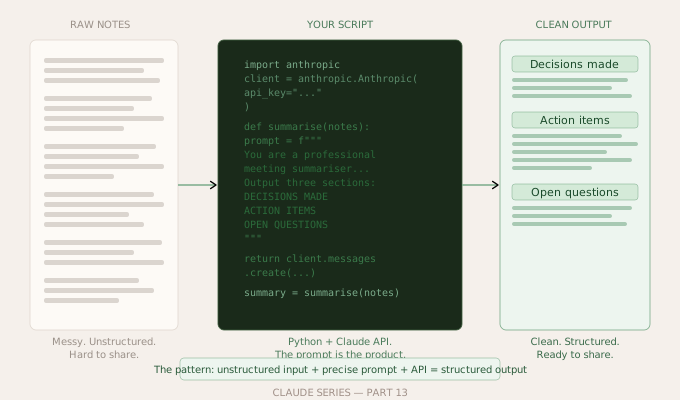
The tool we are going to build is a meeting notes summariser. You paste in raw, messy notes from a meeting, and it produces a clean summary with three sections: the key decisions made, the action items with owners, and the open questions that still need answering.
If you have ever sat in a meeting, typed frantic notes, and then stared at them afterwards wondering how to turn them into something useful, this is for you.
Why This Tool Specifically
I picked this tool for three reasons.
It solves a real problem that most working professionals face at least weekly. The friction between taking notes in a meeting and producing something useful from them is genuine and familiar.
It is simple enough to build in one sitting. No database. No web server. No complicated setup. Just a Python script you run from your terminal.
And it demonstrates a pattern you will use over and over. The pattern of taking unstructured input, passing it to Claude with a specific instruction, and getting structured output back. Once you understand this pattern you can apply it to dozens of different use cases.
The Full Script
Here is the complete tool. I will walk through every part of it below.
import anthropic

client = anthropic.Anthropic(api_key="your-api-key-here")

def summarise_meeting_notes(raw_notes):
    prompt = f"""
You are a professional meeting summariser.
I will give you raw, unstructured meeting notes and you will produce a clean summary.

Your summary must have exactly three sections:

DECISIONS MADE
List each decision that was agreed in the meeting. One decision per line.
If no clear decisions were made, write "No decisions recorded."

ACTION ITEMS
List each action item with the person responsible and any deadline mentioned.
Format: [Person] - [Task] - [Deadline if mentioned]
If no action items were mentioned, write "No action items recorded."

OPEN QUESTIONS
List questions or issues that were raised but not resolved.
If no open questions remain, write "No open questions recorded."

Do not add any other sections. Do not add commentary before or after the three sections.
Be concise. Use plain language.

Here are the meeting notes:

{raw_notes}
"""

    message = client.messages.create(
        model="claude-opus-4-5",
        max_tokens=1024,
        messages=[
            {
                "role": "user",
                "content": prompt
            }
        ]
    )

    return message.content[0].text


raw_notes = """
monday catch up - product and eng
sarah, james, priya, tom attending

talked about the launch. james said we need to push it back one week because the payment
integration isnt ready. sarah agreed. priya wasnt happy about it but didnt block it.
so we are going now for the 24th not the 17th.

tom raised the issue of the onboarding flow - users are dropping off at step 3.
nobody knows exactly why. priya said she would look at the analytics by thursday.
james mentioned we should probably do a user interview or two but nobody took that on.

sarah is going to update the customer comms to reflect the new date. she said she
needs the updated feature list from james before she can do that. james said he
would send it by end of wednesday.

we still dont know what to do about the referral feature. it was on the roadmap
but nobody has the bandwidth. left open for next week.

next meeting same time next monday.
"""

print("Processing meeting notes...\n")
summary = summarise_meeting_notes(raw_notes)
print(summary)
Save this as meeting_summariser.py, replace the API key, and run it with python meeting_summariser.py.
What Just Happened
The output from those messy notes should look something like this:
DECISIONS MADE
- Launch date pushed from 17th to 24th due to payment integration not being ready.

ACTION ITEMS
- Priya - Review onboarding drop-off analytics - By Thursday
- Sarah - Update customer communications with new launch date - After receiving feature list
- James - Send updated feature list to Sarah - By end of Wednesday

OPEN QUESTIONS
- Why are users dropping off at step 3 of the onboarding flow?
- Should the team conduct user interviews, and if so who will own this?
- What is the plan for the referral feature given current bandwidth constraints?
Clean. Structured. Ready to share or paste into a project management tool.
And it took about three seconds.
Walking Through the Code
The summarise_meeting_notes function is doing two things worth understanding.
First it builds a prompt. Not just “summarise this” but a specific, detailed instruction that tells Claude exactly what format to produce and what to do in edge cases. The quality of the output is almost entirely determined by the quality of this instruction. Spend time on your prompt and the output takes care of itself.
Notice these specific choices in the prompt. It tells Claude to use exactly three sections with exact headings. It tells Claude what to write when a section is empty rather than leaving that to chance. It tells Claude not to add commentary before or after. It tells Claude to be concise and use plain language.
Every one of those details is there because I have seen Claude produce something less useful without it. When you test your own version and something is not quite right, the fix is almost always in the prompt.
Second it calls the API and returns the text. The structure is identical to Part 12. You will recognise client.messages.create, model, max_tokens, messages, and message.content[0].text. This is the same pattern every time.
Making It Your Own
The notes I put in the script are hardcoded for demonstration. In real use, you would want to paste your own notes in. The simplest way to do that is to replace the raw_notes variable with a multiline string of whatever you want to summarise.
A slightly more useful version reads from a text file:
with open("notes.txt", "r") as f:
    raw_notes = f.read()

summary = summarise_meeting_notes(raw_notes)

with open("summary.txt", "w") as f:
    f.write(summary)

print("Summary saved to summary.txt")
Now you have a proper workflow. You paste your notes into notes.txt, run the script, and your summary appears in summary.txt. No copying and pasting into Claude. No reformatting. Just run the script.
The Pattern Behind the Tool
This is worth naming explicitly because once you see it you will use it constantly.
Every useful Claude-powered tool follows the same structure. You take some unstructured or semi-structured input. You write a prompt that tells Claude precisely what to do with it and what format to produce. You pass the input and the prompt to Claude via the API. You do something useful with the output.
That is it. The complexity lives in the prompt, not in the code.
Think about what else you could do with this same pattern.
A script that takes a folder of customer support emails and produces a daily digest of the main issues raised. A tool that takes a long research document and extracts only the statistics and their sources. Something that reads a list of job descriptions and pulls out the skills that appear most frequently. A script that takes your weekly task list and produces a prioritised version with reasoning.
Every one of these is the same three lines of code with a different prompt. The prompt is the product.
What Can Go Wrong
A few things are worth knowing before you start adapting this.
The output format can drift on very complex or very long notes. Claude is good at following formatting instructions but it is not perfect. If you are processing dozens of notes automatically and need consistent formatting every time, add validation. Check that the expected section headers appear in the output before you use it.
The API can time out on very long inputs. If you are summarising a three hour meeting transcript, you may hit limits. Split long inputs into chunks and summarise each chunk separately, then combine the summaries.
And the cost adds up at volume. Summarising occasional meeting notes is cheap. Running this script on thousands of documents every day is a different conversation. Check the pricing before you scale.
What’s Next
Part 14 is where something clicks that has not clicked yet in this series.
We have built tools that take input and produce output. Part 14 is about connecting Claude to the things you already use. Your email. Your calendar. Your documents. Using something called MCP, which you may remember from the AI Foundations series, we will show how Claude can do things in the world rather than just respond to prompts.
It is the step that turns Claude from a clever text processor into something that can actually act on your behalf.
Claude Series — Part 13 of 15. A beginner-to-expert guide to using Claude, written for people starting from absolute zero. No jargon. No assumptions.