This is Part 12 of the Claude Series, a beginner-to-expert guide to using Claude from scratch. If you’re just joining, start with Part 1: What Is Claude and Why Does It Feel Different From Google?
We have spent eleven parts in the chat interface. You open claude.ai, you type, Claude responds. That interface is genuinely excellent and for most people it is all they will ever need.
But there is another way to use Claude that opens up a completely different set of possibilities. And it is less intimidating than it sounds.
The API.
If that word makes you want to close this tab, stay with me for two more paragraphs. Because what I want to show you in this post is not a developer tutorial. It is the minimum you need to understand what the API is, why someone who is not a developer might care about it, and what a real working example looks like.
By the end of this post you will have made your first API call to Claude. I promise it is achievable.
What the API Actually Is
API stands for Application Programming Interface. That definition is not very helpful so here is a better one.
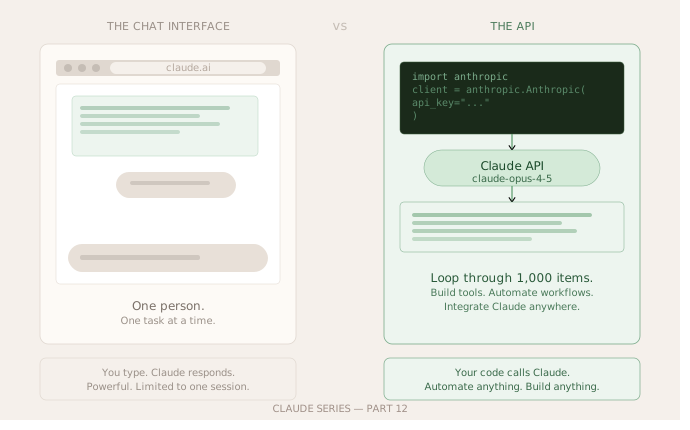
The chat interface at claude.ai is one way to talk to Claude. The API is another way. Instead of typing into a text box in a browser, you send Claude a message from code, a script, an application, or a tool you have built yourself. Claude responds the same way it always does. The difference is that the conversation happens programmatically rather than manually.
Think of it this way. The chat interface is like calling a restaurant to place an order over the phone. The API is like building a direct connection to the kitchen so your orders go through automatically without you having to make the call each time.
The API is how developers build applications that use Claude. It is how companies integrate Claude into their products. It is how you would build something like an automated email responder, a document processing tool, or a custom assistant for a specific workflow.
You do not need to be a software engineer to use it. You need to be comfortable running a short piece of code. If you have ever used Python even briefly, this is within reach.
Why You Might Care as a Non-Developer
The chat interface is great for one-off tasks. But there are situations where the API becomes genuinely useful even for people who do not write code professionally.
If you have a repetitive task that involves sending similar requests to Claude many times, doing that manually in the chat interface is slow. The API lets you send those requests automatically in bulk.
If you want Claude integrated into a spreadsheet, a document, or a tool you already use, the API is how that connection gets made.
If you want to build even a simple personal tool, something that processes a folder of documents, generates a weekly summary, or helps you categorise your notes, the API is the building block.
And honestly, understanding the API even at a basic level changes how you think about Claude. It stops being a chat box and starts being an engine you can connect to things.
Before You Start
You need two things.
An Anthropic account, which you already have if you have been using claude.ai.
An API key. Go to console.anthropic.com, sign in, and look for the API keys section. Create a new key and copy it somewhere safe. Treat it like a password. Do not share it publicly or paste it into documents other people can see.
You also need Python installed on your computer. If you do not have it, go to python.org and download the latest version. It takes about five minutes.
Then install the Anthropic Python library by opening your terminal and running this:
pip install anthropic
That is it for setup.
Your First API Call
Open a text editor, create a new file called hello_claude.py, and paste this in:
import anthropic

client = anthropic.Anthropic(api_key="your-api-key-here")

message = client.messages.create(
    model="claude-opus-4-5",
    max_tokens=1024,
    messages=[
        {
            "role": "user",
            "content": "Explain what an API is in two sentences, as if I have never heard the word before."
        }
    ]
)

print(message.content[0].text)
Replace your-api-key-here with the actual key you copied from the console.
Save the file. Open your terminal. Navigate to the folder where you saved it and run:
python hello_claude.py
Claude will respond in your terminal. You just made your first API call.
What That Code Is Actually Doing
Let me walk through it line by line because understanding it matters more than just running it.
import anthropic loads the Anthropic library you installed.
client = anthropic.Anthropic(api_key="...") creates a connection to Claude using your key. This is how Claude knows who is making the request.
client.messages.create(...) is the actual call. You are telling Claude what model to use, how long the response can be, and what message to send.
The messages part is a list. Each item in the list has a role and content. The role is either user (that is you) or assistant (that is Claude). For a single question you just need one user message.
message.content[0].text is where Claude’s response lives. You print it to see it.
That is genuinely all of it. The rest of what you can do with the API is variations on this structure.
Making It More Useful
Here is a slightly more practical example. This one reads a list of topics and asks Claude to write a one-line summary of each.
import anthropic

client = anthropic.Anthropic(api_key="your-api-key-here")

topics = [
    "compound interest",
    "the water cycle",
    "how vaccines work"
]

for topic in topics:
    message = client.messages.create(
        model="claude-opus-4-5",
        max_tokens=100,
        messages=[
            {
                "role": "user",
                "content": f"Explain '{topic}' in exactly one sentence for a complete beginner."
            }
        ]
    )
    print(f"{topic}: {message.content[0].text}\n")
Run this and Claude will produce a one-sentence explanation for each topic in your list. You could swap that list for anything. A list of customer queries. A list of document titles. A list of product names you want described.
The pattern is the same every time. You loop through your data, you send each item to Claude, you do something with the response.
The Honest Bit About Cost
The API is not free in the same way the free tier of claude.ai is. You pay per token, which is roughly per word, both for what you send and what Claude sends back.
For small experiments like the examples above, the cost is genuinely tiny. A few pence at most. But if you are planning to process thousands of documents or run Claude on large volumes of data, it is worth reading the pricing page at anthropic.com before you start so there are no surprises.
The free chat interface at claude.ai has no per-message cost on the free tier. The API always has a cost, however small.
What This Unlocks
Right now you can send Claude a message from code and get a response back. That is the foundation.
Part 13 is where we take that foundation and build something real with it. A simple tool you can actually use, not just a script that demonstrates the concept. Something that solves a real problem and that you could run again next week on new data.
By the end of Part 13 you will have built your first Claude-powered tool. That is a different thing from using Claude. And it is worth experiencing.
Claude Series — Part 12 of 15. A beginner-to-expert guide to using Claude, written for people starting from absolute zero. No jargon. No assumptions.