This is Part 2 of the Claude Code Series, a complete guide to Claude Code from first principles to real-world use. If you’re just joining, start with Part 1: What Is Claude Code and Why Does It Exist?
Before you install Claude Code, before you run your first command, before you touch a single file with it, there is one thing worth understanding.
Claude Code is not a faster version of Claude.
It is a different kind of system entirely. And if you skip this post, you can still use Claude Code. You can still get things done with it. But you will hit a wall at some point, and you will not understand why.
This post is about what is actually happening inside a Claude Code session. Not the technical plumbing, but the thinking pattern. Once you see it, everything else in this series will make more sense.
The Word “Agentic” and Why It Matters
You will see the word “agentic” used a lot in AI writing. It is one of those words that sounds impressive and explains nothing.
Here is what it actually means in practice.
When you use Claude in a normal chat interface, something simple happens. You type. Claude reads what you typed and generates a response. That response lands in the chat window. You read it. You respond again. Claude reads that and generates the next response. And so on.
Claude is always reacting. It never acts on its own. Every single thing it does is a direct response to something you just said. The moment you stop typing, everything stops.
An agentic system is different. You give it a goal, not a prompt. It figures out what steps are needed to reach that goal, executes those steps one by one, checks the results of each step, and adjusts the next step based on what it found. It keeps going until the goal is reached or it gets stuck.
You can walk away. It is still working.
That is the core of what agentic means. A system that pursues a goal across multiple steps without waiting for you to tell it what to do next at each turn.
Claude Code is that kind of system.
The Loop That Runs Everything
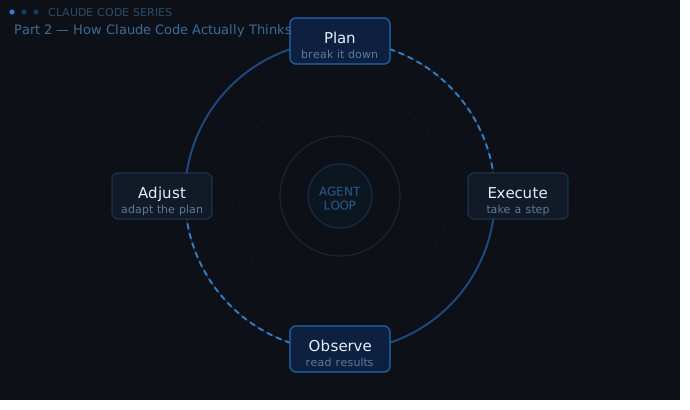
Inside every Claude Code session, a loop is running. It is always the same loop. Understanding it is the whole point of this post.
Plan. Claude Code looks at your goal and breaks it down. What files need to exist? What needs to change? What order should things happen in? It is not just reacting to your words. It is thinking about what a solution actually looks like.
Execute. It takes a step. This might be reading a file. Writing a function. Running a command and capturing the output. Installing a package. Making a directory. Whatever the next concrete action is in the plan.
Observe. It looks at what happened. Did the command succeed? Did the file look like it expected? Did the function return the right value? This is not optional. Claude Code reads its own results the same way you would.
Adjust. Based on what it observed, it updates its understanding. Maybe the file structure was different from what it assumed. Maybe there was an error. Maybe something worked perfectly. The next step in the plan changes based on what was just learned.
And then the loop starts again. Plan, execute, observe, adjust. Over and over until the task is done or until Claude Code hits something it needs you to decide.
This is not a metaphor. This is literally what is happening in the session. Every tool call, every file read, every command run is one iteration of this loop.
What This Means In Practice
Here is a concrete example of the difference.
You are trying to build a simple script that reads a folder of CSV files and combines them into a single spreadsheet.
In the chat interface, you describe what you want. Claude writes you a script. You copy it. You run it yourself. It errors out because the CSV files in your actual folder have slightly different headers than the ones Claude assumed. You copy the error message back into the chat. Claude revises the script. You copy and run again. It still fails because one file has a blank row at the top. You copy that error. Claude fixes it. And so on.
You are the loop. You are the one observing the output and carrying the result back to Claude. Every iteration requires your manual involvement.
In Claude Code, the loop runs without you in the middle.
Claude Code reads the folder first, before writing any code. It looks at the actual files. It sees the header inconsistency. It notes the blank row in that one file. It writes the script to handle those specific things. It runs the script and reads the output. If there is an error, it reads the error directly and revises. It runs again.
By the time it comes back to you, it has usually already done the thing. Not described how it would do the thing. Done it.
That is the difference an agentic loop makes. It is not faster autocomplete. It is a different relationship with the task.
Why This Changes How You Should Direct It
Most people who start using Claude Code instinctively treat it like the chat interface. They give it a prompt the way they would give Claude a prompt. Detailed. Exploratory. Mid-task.
This works, but it does not work as well as it could.
Claude Code responds better to goals than to instructions.
In the chat interface, you tell Claude what to do step by step because you are managing each step yourself. You say “write a function that does X” because you are going to take that function and do something with it.
In Claude Code, you describe what the end result should look like, and then you let the loop figure out the steps. “Build a script that reads every CSV in this folder and combines them into a single file called output.csv, handling different header formats and skipping blank rows at the top” is a better Claude Code prompt than “write a function to read a CSV file.”
The more clearly you can describe the finished state you want, the better Claude Code can plan the path to get there.
This does not mean vague prompts fail. Claude Code will work with what it has. But it will make more assumptions. And some of those assumptions will be wrong. And then it will have to observe that and adjust. Which takes more time than giving it the full picture upfront.
When the Loop Gets Stuck
The loop is powerful, but it does not run forever. There are situations where Claude Code stops and waits for you. These are not failures. They are the system working correctly.
Claude Code will pause when it needs to make a decision you should make, not it. Should it overwrite a file that already exists? Should it delete something? Should it use one approach or another when both seem valid?
It will also pause when it hits something genuinely ambiguous. If your goal was unclear enough that two reasonable interpretations exist, Claude Code will often stop and ask which one you meant rather than guess wrong and waste a lot of time.
And it will stop when something goes wrong in a way it cannot fix on its own. Not every error is recoverable within the loop. Some errors tell Claude Code that it is missing a dependency you need to install, or that it does not have permission to access a folder, or that a service it is trying to reach is not running. Those require you.
When Claude Code stops and talks to you mid-task, it is usually doing the right thing. It is recognising the edge of what it can decide alone.
The Trust Question
There is a question everyone has at this point, even if they do not say it out loud.
If Claude Code is running a loop on my files without me watching every step, how do I know it is not going to do something I did not want?
This is a fair thing to think about.
A few things worth knowing. Claude Code tells you what it is about to do before it does it. You will see a list of proposed actions before they run. You can stop it at any point. You can run it in a mode where it asks for your approval at each step, which is slower but gives you full visibility. And nothing it does is permanent in the way that matters most, because good practice when using Claude Code is to have your files in version control, which means almost anything can be undone.
There is a whole post later in this series about file safety and how to set up a working environment where Claude Code can operate freely without you having to worry about it touching something irreversible. For now, just know that the autonomy of the loop comes with guardrails. You can always refer to Cloud documentation if you are looking for specific details.
One More Thing Before You Install
Most of the rest of this series is practical. How to install it. How to configure it. How to prompt it. How to read the code it writes. Real sessions, real mistakes, real results.
But this conceptual layer matters. Not as a formal thing you have to know before you are allowed to proceed. As a mental model that makes everything else click faster.
When Claude Code does something unexpected, you will now have a way to think about it. It is in the loop. It observed something, adjusted its plan, and took a step you did not anticipate. That framing helps you decide whether to correct it, let it continue, or stop and redirect.
When you write your first prompt for a real task, you will know to describe the outcome rather than the steps. Because the loop handles the steps.
When Claude Code pauses and asks you something mid-task, you will know why. It hit something that belongs to you to decide.
The loop is the thing. Plan, execute, observe, adjust. Once that is in your head, you are ready to actually use it.
What’s Next
Part 3 is for anyone who has never used a terminal seriously and wants to change that before continuing.
The terminal is where Claude Code lives. You do not need to become a command line expert. But you do need enough comfort with it to not feel lost when you run your first Claude Code command. Part 3 gives you exactly that. What the terminal actually is, why Claude Code uses it, and enough of the basics to feel grounded before installation.
If you are already comfortable in a terminal, you can skip ahead to Part 4, which is the full installation walkthrough.
Claude Code Series — Part 2 of 18. A complete guide to Claude Code from first principles to real-world use.