Imagine you buy a brand-new, state-of-the-art laptop, but you realize it has no ports. No USB, no HDMI, no headphone jack. To connect a mouse, you have to build a custom adapter. To connect a printer, you have to write a new piece of software.
Until recently, this was exactly how AI worked. If you wanted an AI (like Claude or ChatGPT) to read your local files or check your Google Calendar, developers had to build a messy, custom “bridge” for every single tool.
Enter MCP the Model Context Protocol.
What exactly is MCP?
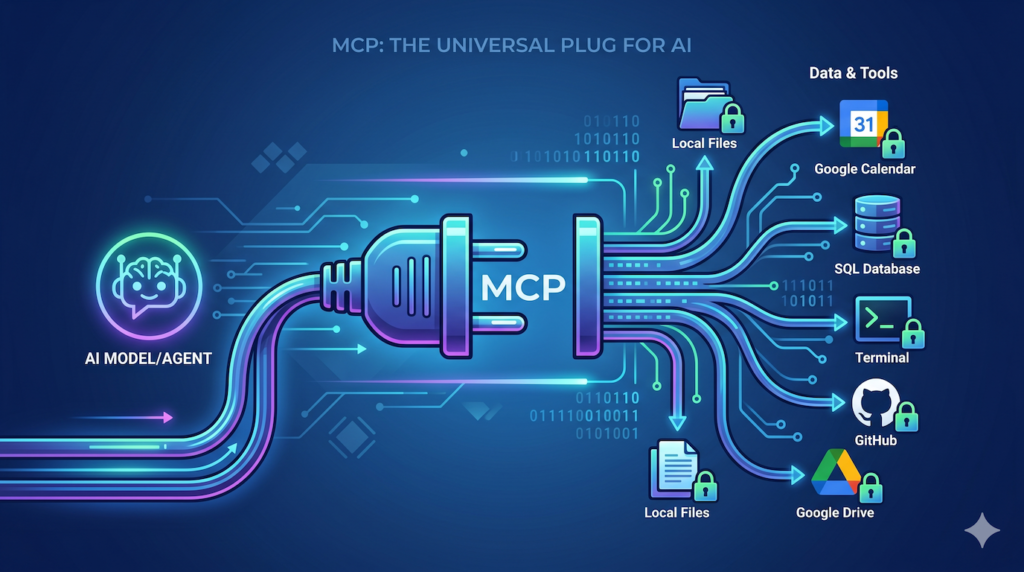
Created by Anthropic, MCP is an open-source standard that acts like a universal plug for AI. It allows AI models to safely and easily “plug into” your data and tools without needing custom code every single time.
The Three Main Characters
To understand how it works, think of a restaurant:
- The Client (The Waiter): This is the app you are actually using (like the Claude Desktop app or a coding tool like Cursor). The waiter takes your request to the kitchen.
- The Server (The Kitchen): This is a small program that knows how to talk to a specific tool (like Google Drive, a SQL database, or your local folder). It prepares the “data” for the AI.
- The Model (The Chef): This is the AI brain (the LLM). It doesn’t know where your files are; it just waits for the “Waiter” to bring it the ingredients (context) so it can cook up an answer.
Real-World Examples: MCP in Action
1. The “Supercharged” Personal Assistant
Before MCP: You ask an AI to summarize a meeting. You have to manually copy-paste the transcript from your files into the chat box.
With MCP: The AI has an “MCP Server” for your local filesystem. You simply say, “Summarize the transcript in my ‘Meetings’ folder,” and it reaches out, reads the file, and gives you the summary instantly.
2. The Expert Coder
Before MCP: A developer has to copy-paste errors from their terminal into the AI.
With MCP: The AI can “plug in” to the terminal directly. It sees the error as it happens, suggests a fix, and can even run a test to see if the fix worked—all because it has a standard way to talk to the computer’s tools.
3. The Data Analyst
Before MCP: To analyze a company database, you’d have to export a CSV file and upload it.
With MCP: The AI connects to a secure Database MCP Server. You can ask, “Who were our top 5 customers in March?” and the AI queries the database directly to give you a live answer.
Why does this matter for you?
- For Users: It makes AI more helpful. Instead of a chatbot that only knows what it was trained on, you get an assistant that knows your data and can use your tools.
- For Developers: You don’t have to reinvent the wheel. If you build one “MCP Server” for your app, any AI that speaks MCP can now use your app.
- For Security: MCP is designed to be “local-first.” You decide which folders or tools the AI can see. It’s not a wide-open door; it’s a secure, monitored connection.
Summary
MCP is moving us away from “Chatbots” and toward “AI Agents.” It is the glue that connects the brain of the AI to the hands and eyes of our digital world.
Key Terminology Reference
| Term | Simple Definition |
|---|---|
| Protocol | A set of rules for how two things talk to each other. |
| Context | The background information (files, emails, data) the AI needs to answer correctly. |
| Standardization | Making sure everyone uses the same “plug” so things just work. |