
This is Part 3 of the Claude Series, a beginner-to-expert guide to using Claude from scratch. If you’re just joining, start with Part 1: What Is Claude and Why Does It Feel Different From Google?
Something happens to almost every new Claude user around their second or third week.
They’ve had a genuinely useful conversation. Maybe Claude helped them draft something, or think through a problem, or understand a topic they’d been stuck on. It felt like talking to someone who actually got them.
Then they come back the next day, open Claude, and say something like “Can we continue from where we left off yesterday?”
And Claude has absolutely no idea what they’re talking about.
No recollection. No memory of the conversation. No sense of who this person is or what they discussed. It’s like meeting someone at a party, having a brilliant two-hour conversation, and then running into them the next morning to find they have zero memory of you.
That moment, for a lot of people, is genuinely jarring.
So before it happens to you, let’s talk about why it happens, what it means, and more importantly, the simple habits that make it a complete non-issue.
Why Claude Forgets Everything
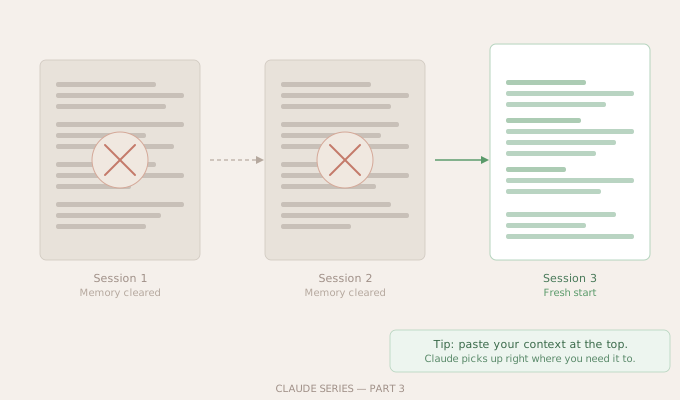
Claude doesn’t have a persistent memory the way your brain does. Every time you open a new chat, Claude starts completely fresh. No notes from last time. No record of your name, your job, your preferences, or anything you’ve ever told it before.
This isn’t a bug. It’s actually how it was designed, partly for privacy reasons. Claude doesn’t retain information about you between sessions, which means nothing you’ve ever said to it is sitting in some database attached to your name, waiting to be seen.
But it does create a practical problem.
Within a single conversation, Claude remembers everything perfectly. You can refer back to something you said twenty messages ago and it will know exactly what you mean. The memory works brilliantly inside a session. It just resets the moment you close that chat and open a new one.
The Context Window — What Claude Can Actually See
Here’s the mental model that makes this all click.
Imagine Claude is reading a piece of paper. Everything written on that paper, it knows. Everything not on that paper, it has no access to. When you start a new conversation, you hand Claude a blank piece of paper. As the conversation goes on, your messages and Claude’s responses get written onto that paper. Claude can see all of it at any time.
But when the conversation ends, the paper disappears. The next conversation starts with a new blank page.
That paper is called the context window. It’s the total amount of text Claude can hold and refer to in a single conversation. Claude’s context window is actually quite large, meaning you can have very long, detailed conversations without Claude losing track of things. But it resets completely between sessions.
This is why copy-pasting relevant background at the start of a new conversation works so well. You’re essentially rewriting the important things back onto the paper before you begin.
The Simple Habits That Fix This
Once you understand the context window, working around the memory reset becomes second nature. Here are the three habits that make the biggest difference.
Habit 1: Start with a quick context paragraph
When you open a new chat about something ongoing, spend thirty seconds writing a short setup. Who you are, what you’re working on, and what you need today.
Something like: “I’m a marketing manager working on a product launch for a B2B SaaS tool. We’ve been struggling with positioning for technical buyers who aren’t decision-makers. Today I want help writing a one-pager that explains the product to engineers without losing them in business language.”
Claude now knows your role, your situation, your audience, and your goal for this session. That one paragraph saves you five exchanges of back-and-forth while Claude figures out who it’s talking to.
Habit 2: Keep a running “Claude brief” document
This is the habit that changes things for people who use Claude regularly. Create a simple text document, maybe in Notes or Google Docs, that you update as you go. It’s basically a cheat sheet about yourself that you paste at the start of conversations when it’s relevant.
It might include your job role, the projects you’re currently working on, your writing tone preferences, things Claude should know about your context. It doesn’t have to be long. Even a ten-line summary saves enormous time.
When you start a new Claude conversation, paste the relevant parts at the top. Done.
Habit 3: Save your best conversations
If a conversation produced something really useful, a framework, a draft, a decision you worked through together, save it outside of Claude. Copy it into a document. Claude’s chat history does stay accessible in your sidebar for a while, but don’t rely on it as long-term storage. The real output lives in your own files.
Claude Projects — The Built-In Solution
If you’re using Claude on the paid plan, there’s a feature called Projects that was built specifically for this problem.
A Project is a persistent space where you can give Claude standing instructions and upload files that it will always have access to. Every conversation inside that Project starts with Claude already knowing your context, your preferences, and any documents you’ve shared.
So if you have a Project set up for, say, your weekly team newsletter, Claude will already know the tone you use, the audience you write for, the format you prefer, and any background documents you’ve uploaded, every single time you open a conversation in that Project.
It’s the closest thing Claude has to actual memory. And once you’ve set one up, it genuinely feels like a different tool.
We’ll go much deeper into Projects in a later part of this series. For now, just know it exists and that it’s worth exploring once you’ve got comfortable with the basics.
The Unexpected Upside
Here’s something I didn’t expect when I first learned about the memory reset.
It’s actually freeing in some ways.
Every conversation with Claude is a clean slate. Whatever went wrong in a previous session, whatever direction you went down that didn’t work, whatever confused or unhelpful exchange you had, none of it carries forward. You’re not carrying baggage from a bad conversation into the next one.
You can also be a completely different person in different conversations. In one chat you can be working on something deeply technical. In another you can be thinking through something personal. In another you can be brainstorming wildly without worrying that Claude is going to confuse contexts.
The reset that first feels like a limitation starts to feel more like a feature once you’ve built the habits to work with it rather than against it.
A Quick Summary Before We Move On
Claude’s memory works like this. Inside one conversation, it remembers everything. The moment you close that chat, everything resets. Each new conversation starts completely blank.
The fix is simple. Start with context. Keep a personal brief you can paste. Save anything important outside of Claude. And if you’re on the paid plan, use Projects for anything you return to regularly.
Once these habits are in place, the memory reset stops being something you notice at all.
What’s Next
In Part 4, we’re going to get into the real stuff. I spent a full working week using Claude for everything I could think of, and I kept notes on what actually saved time and what turned out to be hype.
Some of it was obvious. Some of it genuinely surprised me. And there were a couple of use cases I almost dismissed that turned out to be the most useful of all.
Claude Series — Part 3 of 15. A beginner-to-expert guide to using Claude, written for people starting from absolute zero. No jargon. No assumptions.