
This is Part 2 of the Claude Series, a beginner-to-expert guide to using Claude from scratch. If you’re just joining, start with Part 1: What Is Claude and Why Does It Feel Different From Google?
At the end of the last post, I asked you to do one thing. Go to claude.ai, create a free account, and just have a look around. Don’t type anything yet. Just get comfortable. If you did that, great. You’re ahead of most people.
If you didn’t, that’s fine too. But open it now, because this post is going to be a lot more useful if you’re actually doing it alongside me rather than just reading about it.
Because here’s what usually happens when someone opens Claude for the first time.
They sit there. They stare at the empty text box. And then they type something like:
“Hello”
Or:
“What can you do?”
And Claude gives them a polite, somewhat generic response. They nod. They close the tab. And for the next three weeks, they tell people “yeah I tried Claude, it was fine I guess.”
That is the wrong way to start. And it’s not their fault. Nobody told them how to do it right.
So that’s what this post is about.
The Empty Box Problem
There’s something psychologically strange about an empty chat box with infinite possibility. When you can ask anything, it’s surprisingly hard to ask something.
Most people default to testing the AI rather than actually using it. They ask trivia questions. They ask it to write a poem about their cat. They ask it something they already know the answer to, just to see if it gets it right.
None of that tells you whether Claude is useful for your actual life.
The right first question isn’t a test. It’s something you genuinely want help with. Something sitting on your to-do list, or something you’ve been confused about, or a task that’s been hanging over you. Think about that for a second before we move on.
Got something? Good. We’re going to use that.
Why Most Prompts Are Too Short
The single most common mistake beginners make with Claude is writing prompts that are too short and too vague.
Let me show you what I mean.
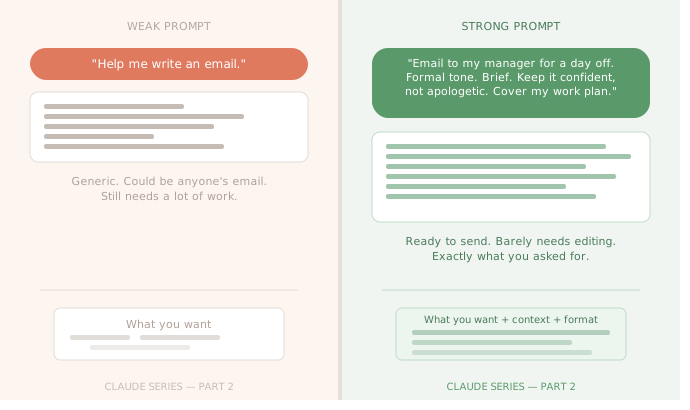
Weak prompt: “Help me write an email to my manager.”
Claude can technically respond to this. But the response will be so generic it’ll be almost useless. Which manager? About what topic? What’s the relationship like, formal or casual? What outcome do you want from the email? What have you already tried to say?
Strong prompt: “I need to write an email to my manager asking for a day off next Friday for a personal appointment. We have a fairly formal relationship and I usually keep things professional. I don’t want to over-explain but I also want to make sure she knows I’ll make sure my work is covered. Can you help me draft something that’s polite, brief, and doesn’t sound like I’m asking for permission. Just informing her.”
Same basic request. Completely different output.
The difference is context. Claude doesn’t know anything about you, your workplace, your manager, or your situation unless you tell it. The more you put in, the more useful what comes out will be.
I know this feels like more effort. But writing that second prompt takes maybe 45 seconds. And the email Claude produces from it will need almost no editing. The time you spend upfront making the prompt specific saves you far more time on the back end.
The Three Things Every Good Prompt Has
You don’t need to memorise a formula. But when I look back at every time Claude has genuinely impressed me, the prompt usually had three things.
1. What you want — the task Be specific. Not “help me write something” but “write a first draft of a message.” Not “explain this” but “explain this like I’m someone who knows nothing about finance.”
2. The context Claude needs Who is this for? What’s the situation? What constraints matter? What tone? What length? Claude has no idea about your life. Give it the relevant details.
3. What a good response looks like This one is optional but powerful. “Keep it under 150 words.” “Use bullet points.” “Make it sound warm, not corporate.” “Give me three options, not just one.” Telling Claude what the output should look like saves a lot of back-and-forth.
Let’s Try It Right Now
Here are three examples, a before and after for real situations. Pick the one closest to something on your plate.
Situation 1: You need to understand something complicated
Before: “Explain compound interest.”
After: “I’m trying to understand compound interest for the first time. I’m not great with numbers and finance feels overwhelming to me. Can you explain compound interest using a simple real-world example, maybe something involving savings, and keep the explanation short enough that I can re-read it twice and actually get it?”
Situation 2: You’re stuck on something you need to write
Before: “Write me a LinkedIn post.”
After: “I want to write a LinkedIn post about completing an online course in data analytics. I want it to feel genuine and a bit personal, not like the usual ‘excited to announce’ LinkedIn stuff that sounds like everyone else. I’m someone who changed careers at 34 and this course felt like a big step. Keep it under 200 words and make it sound like a real person wrote it.”
Situation 3: You need to make a decision
Before: “Should I take the new job offer?”
After: “I have a job offer on the table and I’m genuinely torn. The new job pays 20% more but it’s a startup with less stability. My current job is secure but I’ve felt stuck for about a year. I have a family to think about and I can’t afford to take a big financial risk, but I also worry about staying somewhere that isn’t growing me. Can you help me think through the decision? Not tell me what to do, but help me ask myself the right questions.”
Notice something about that last one. I said “not tell me what to do, but help me ask myself the right questions.” Claude can do that. You can direct the kind of help you want, not just the topic.
The Conversation Is the Feature
This is the part most people miss completely.
Claude isn’t like a search engine where you type something, get a result, and leave. It’s a conversation. The first response is almost never the final one. It’s the starting point.
After Claude gives you something, you can ask it to change the tone. “Can you make this sound less formal?” You can ask it to go deeper. “Say more about the third point, I didn’t fully get that.” You can push back. “I don’t think that’s quite right. The situation is actually more like this.” You can try a different angle. “Forget that last answer. Let’s approach it differently.” You can even ask why. “Why did you suggest that approach instead of just doing X?”
Every follow-up makes the response better. A mediocre first draft becomes a good second draft, becomes something genuinely useful by the third exchange.
The people who get the most out of Claude treat it like a conversation with a knowledgeable colleague. Not a one-shot Google query.
One More Thing: Claude Won’t Judge You
This sounds small but it matters.
A lot of people hold back from asking what they actually want to ask. Because they feel embarrassed about not knowing something, or they’re worried the question sounds stupid, or they don’t want to seem like they’re struggling.
Claude doesn’t have opinions about you. It won’t raise an eyebrow if you ask it to explain something three times in three different ways because you still don’t get it. It won’t think less of you for asking a question your colleagues would smirk at. It won’t remember it later.
This means you can be totally honest about your level of understanding. In fact, the more honest you are, the better Claude can help.
“I’ve read three articles about this and I still don’t understand it. Please explain it to me like I’m starting from zero.” That is one of the most powerful prompts you can write. It tells Claude exactly what kind of response you need.
Try This Before the Next Post
Before you read Part 3, I want you to have one real conversation with Claude. Not a test. Something from your actual life.
Take something you’ve been putting off, something confusing you, or something you need to write and try the prompt framework. What you want, the context Claude needs, and what a good response looks like. See what happens.
If the first response isn’t quite right, don’t close the tab. Reply and tell Claude what to adjust. Have the conversation.
That’s when it stops feeling like a gimmick and starts feeling like a tool.
What’s Next
In Part 3, we’re going to talk about the one thing that trips up almost every new Claude user eventually. The memory problem.
Claude doesn’t remember you between conversations. Every time you open a new chat, you’re a stranger. That sounds frustrating, but once you understand how it works, there are some genuinely simple habits that make it a non-issue. And in some ways even an advantage.
Claude Series — Part 2 of 15. A beginner-to-expert guide to using Claude, written for people starting from absolute zero. No jargon. No assumptions.