
This is Part 8 of the Claude Series, a beginner-to-expert guide to using Claude from scratch. If you’re just joining, start with Part 1: What Is Claude and Why Does It Feel Different From Google?
If you have been following this series from the beginning, you have spent seven parts learning how to have better conversations with Claude. Better prompts. Better follow-ups. Better use of context.
All of that still matters. But Part 8 is about something different.
What if Claude already knew everything it needed to know about you before you typed a single word?
What if every conversation started with Claude already understanding your role, your tone preferences, your audience, the things you care about, and the things you want it to avoid? No re-explaining yourself. No correcting the same habits every session. Just straight into the work.
That is what a system prompt does. And once you have written one, going back to conversations without it feels like starting every meeting by re-introducing yourself to colleagues you have worked with for months.
What a System Prompt Actually Is
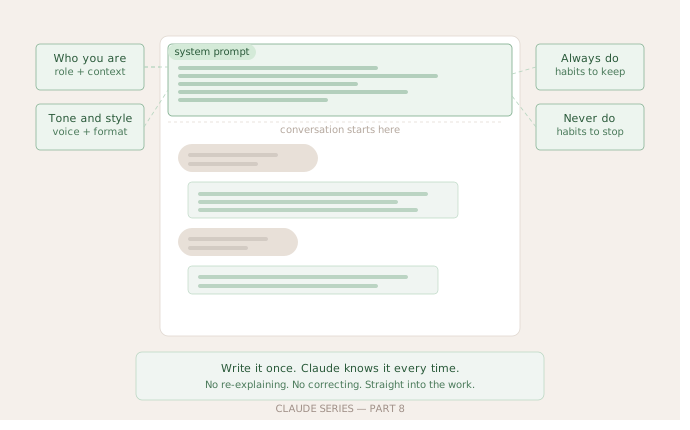
Think of a regular conversation with Claude as a blank sheet of paper. You write something, Claude responds, you go back and forth. The system prompt is the text that lives above all of that. Claude reads it before your very first message. It sets the context for everything that follows.
In the Claude interface you access it through Projects, which we touched on briefly in Part 3. When you create a Project and give it instructions, those instructions are the system prompt. Claude reads them at the start of every conversation inside that Project.
In more technical settings, like the API, developers write system prompts directly. But you do not need to be a developer to benefit from this. The Projects feature in Claude gives you the same power through a simple text box.
Why It Changes Everything
Here is a concrete example of what I mean.
Without a system prompt, if I want Claude to help me write something in my voice, I have to explain that context every single time. My role, my audience, my tone, the things I want avoided. Five minutes of setup before I can get to the actual work. And if I forget to include something, the output drifts.
With a system prompt in a Project, I wrote that context once. Now every conversation in that Project starts with Claude already knowing all of it. I open the chat and go straight to “here is the draft, tell me what is not working.”
The system prompt does not replace the conversation. It just removes the friction at the start of every single one.
What Goes in a System Prompt
A good system prompt covers four things. Not all four are always necessary but they are the right categories to think about.
Who you are and what this Project is for
Claude has no idea who is talking to it. Give it the relevant context. Not your life story, just the specific context that matters for this Project.
“I am a product manager at a B2B software company. This Project is for drafting internal communications to my engineering team.”
That one sentence changes how Claude frames everything it produces.
The tone and style you want
This is where most people underspecify. “Professional” means nothing. “Warm but direct, no corporate jargon, short paragraphs, active voice” means something Claude can actually use.
If you have a piece of writing you think represents your voice well, paste a paragraph or two and say “this is an example of the tone I want.” That is more useful than any description.
What Claude should always do
Specific behaviours you want in every response. “Always give me three options, not one.” “Always flag when you are uncertain about something.” “Always keep responses under 200 words unless I ask for more.” “Always ask a clarifying question if the brief is vague.”
What Claude should never do
The guardrails. “Never use bullet points.” “Never start a response with a compliment about my question.” “Never suggest I consult a professional unless the topic is genuinely outside your knowledge.” “Never use the word leverage.”
That last one sounds silly but if you have a word you hate, put it in the system prompt. You will never see it again.
One Thing to Know About System Prompts
They are instructions, not magic. Claude will follow them consistently but it is not incapable of drifting in a very long conversation. If a session goes on for a long time and the system prompt instructions stop feeling relevant to what you are discussing, Claude may apply them less strictly.
For most use cases this does not matter. But if you are doing something where the instructions are critical throughout, it is worth a quick reminder mid-conversation. Just a line like “remember to keep this under 150 words and in the tone we agreed” is enough to bring it back.
Also, a system prompt does not override the fundamental things Claude will and will not do. It shapes behaviour within Claude’s existing capabilities. It does not unlock anything that is not already there.
What’s Next
Part 9 is where the series gets into one of the most underused features in Claude.
We have talked about system prompts giving Claude a standing brief. Part 9 is about Projects more broadly. How to set one up properly, how to use file uploads to give Claude permanent access to documents it needs, and how to build what is effectively a personalised assistant for a specific part of your work.
It is the closest thing Claude has to actual memory. And the difference between using Claude with and without a properly set-up Project is significant enough that I want to spend a whole post on it.
Claude Series — Part 8 of 15. A beginner-to-expert guide to using Claude, written for people starting from absolute zero. No jargon. No assumptions.