
This is Part 4 of the Claude Series, a beginner-to-expert guide to using Claude from scratch. If you’re just joining, start with Part 1: What Is Claude and Why Does It Feel Different From Google?
After Part 2 and Part 3, I had a small challenge for myself.
Stop writing about Claude. Start actually using it. For everything. For a full working week.
I kept a note on my phone every time I used it, what I asked, how useful it was, and whether it saved me time or just added a step. Five days. Real work. No cherry-picking the good bits.
What follows is an honest account of that week. The things that worked immediately. The things that disappointed me. And the two use cases I almost skipped that turned out to be the most valuable of all.
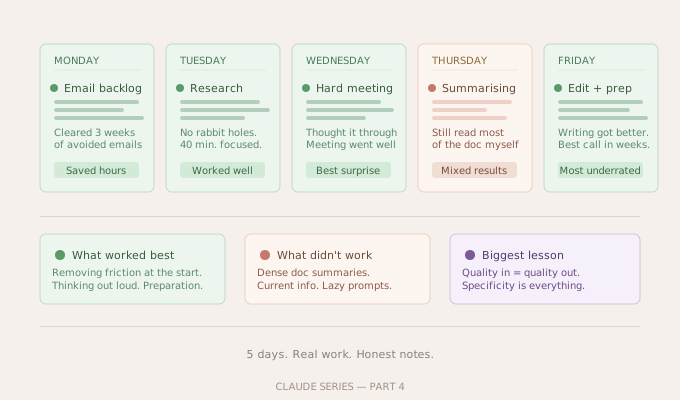
Monday: The Email Backlog
I started the week with something embarrassing. A folder of emails I had been putting off for anywhere between three days and three weeks. Replies that needed careful wording. A follow-up to someone I had left on read for too long. A message declining a collaboration without burning the relationship.
I gave each one to Claude with the full context. Who the person was, what the situation was, what outcome I wanted, and what tone felt right.
The results were genuinely good. Not perfect, but good enough that I spent maybe two minutes editing each one instead of twenty minutes staring at a blank reply window. The email to the person I had left waiting was the best one. I told Claude I was apologetic but didn’t want to over-explain. It threaded that needle better than I would have on my own.
By 11am, a folder that had been haunting me for weeks was empty.
That alone was worth the week.
Tuesday: Research Without the Rabbit Hole
I needed to understand a topic for a project I was working on. Normally this means opening twelve tabs, reading six of them, losing the thread, starting over, and eventually landing on a Wikipedia page I probably should have just read first.
I tried something different. I asked Claude to give me a structured overview of the topic. Not everything, just enough to understand the landscape. Then I asked follow-up questions on the parts I didn’t understand. Then I asked it to explain one specific concept three different ways until it clicked.
The whole thing took forty minutes. Focused, linear, no rabbit holes.
What I noticed is that Claude is particularly good at explaining the relationship between ideas. Not just what things are, but how they connect to each other, why one thing leads to another, where the disagreements in a field are. That kind of contextual understanding is exactly what you don’t get from reading individual articles.
The one limitation worth naming: for anything where current events matter, Claude’s knowledge has a cutoff date. It is not a replacement for actual up-to-date sources on fast-moving topics. On those I still used it to understand the background, then went to recent articles for the current state of play.
Wednesday: The Meeting I Was Dreading
There was a difficult conversation I needed to have with someone I work with. A situation that had been building for a while. I knew what needed to be said but I kept finding reasons to delay it.
I did something I hadn’t tried before. I told Claude about the situation in detail, what had happened, what I was trying to achieve, what I was worried about, and asked it to help me think through how to approach the conversation.
It didn’t tell me what to do. It asked me questions. What outcome would feel like a success? What was I most afraid of saying? Was there anything the other person might be thinking that I hadn’t considered? What had I already tried?
By the end of that conversation with Claude, I had a much clearer sense of what I actually wanted to say and why. The meeting happened that afternoon. It went better than any of the previous conversations on the same topic.
I want to be careful about how I describe this because I don’t want it to sound like Claude replaced the human judgment involved. It didn’t. What it did was give me a space to think out loud without burdening another person with it, and to stress-test my own thinking before walking into a difficult room.
That was genuinely valuable in a way I hadn’t expected.
Thursday: The Stuff That Didn’t Work
In the spirit of honesty, Thursday was humbling.
I tried using Claude to summarise a long report I needed to get through. I pasted the text in and asked for a summary. The summary was fine but it wasn’t faster. By the time I’d pasted everything, reviewed the summary, gone back to check a few things that felt off, I had basically read the report anyway. For dense documents with a lot of specific numbers and details, my own reading was more reliable.
I tried using Claude to brainstorm ideas for a project. The ideas it generated were competent and sensible. They were also ideas I could have come up with myself. Not bad, just not surprising. I’ve since learned that brainstorming with Claude works much better when you give it real constraints and push back on its first response rather than accepting it. But on Thursday I was just asking it to generate ideas and it gave me ideas. Useful, not revelatory.
I also tried asking it a question where I needed a very current, specific answer. It gave me an answer that was confident and almost certainly out of date. That was a useful reminder. Claude is not the tool for real-time information.
Friday: The Two That Surprised Me
I almost didn’t try either of these. They felt too simple to bother with.
The first one was using Claude to edit my own writing. Not to rewrite it, just to read it and tell me where it lost momentum, where a sentence was doing too much work, where the logic jumped without explanation. I pasted in something I had written and asked it to be honest.
It was very good at this. Better than I expected. It found a paragraph I had been proud of and pointed out that it was doing the work of three separate ideas that each deserved their own space. It was right. I restructured the piece and it was noticeably better.
The second surprise was using Claude to prepare for something. I had a call with someone I hadn’t spoken to in a while, in a field I know less well than I’d like. I spent fifteen minutes with Claude beforehand. I told it about the person, the context, what I wanted to get out of the conversation, and what I was uncertain about. It helped me think of questions I wouldn’t have thought to ask and flagged a few things I should probably know before the call started.
I walked into that call more prepared than I usually am. The conversation was better for it.
What I Actually Learned From the Week
A few honest conclusions after five days.
Claude saves the most time on tasks where the problem is starting, not finishing. The emails I was avoiding, the conversation I was dreading, the research I kept putting off. The friction is almost always at the beginning. Claude removes that friction.
It is less useful when you need speed and precision on current factual information. For that, you still need the actual sources.
The quality of what you get is almost entirely determined by the quality of what you put in. The times I was lazy with my prompt, I got something generic. The times I was specific and gave it real context, I got something genuinely useful.
And the use case I would have predicted least before that week: thinking out loud. Using Claude as a structured conversation partner to work through something complicated. That turned out to be one of the most consistently valuable things I did all week.
What’s Next
In Part 5 we are going to look at one of the most misunderstood ways people use Claude. Writing.
Most people use it as a ghostwriter. They ask it to write something, paste it in, and publish it. That’s the approach that produces content that reads like content. There’s a different way to use Claude for writing that actually makes your own writing better without replacing your voice. That’s what Part 5 is about.
See you there in part 5
Claude Series — Part 4 of 15. A beginner-to-expert guide to using Claude, written for people starting from absolute zero. No jargon. No assumptions.